The Microsoft Publisher alternative that opens your .pub files
Bring your bulletins, newsletters and flyers into Acta with their pages, text boxes and pictures, and keep making them with the layout tools you know: linked text boxes, columns, text wrapped around pictures. In any browser, with your whole team.
Free for one editor. Works on Windows, Mac and Chromebook. Nothing to install.
Bulletin – October 18.pub
Publisher file · 4 pages
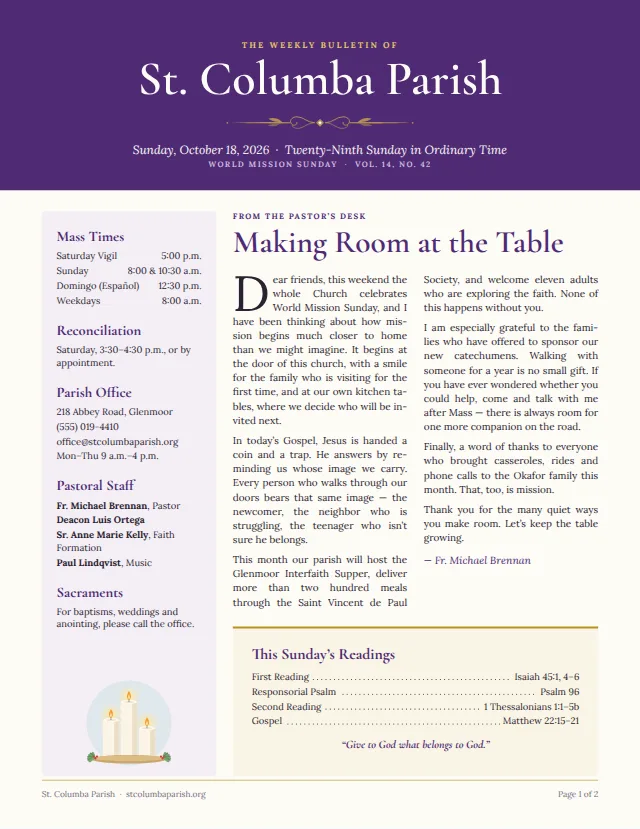
Imported Bulletin – October 18.pub
4 pages.
A few things came across differently:
- Objects on master pages were copied onto each page that uses them.
- Border art became plain lines.
What changed
Publisher is gone from Microsoft 365. Your files aren’t.
Microsoft retired Publisher in October 2026. It suggests Word or PowerPoint instead, and turning each .pub file into a PDF to open in Word, but those are made for letters and slides. A bulletin is laid out in boxes and columns, and Acta is made for that.
October 1, 2026
Publisher left Microsoft 365. Subscribers can no longer install it, or open and edit .pub files in it.
October 13, 2026
Support ended for Publisher bought outright, such as Publisher 2021. It still opens your files, but gets no more fixes or security updates.
Your files
Nothing was deleted: your .pub files are where you left them. What’s gone is the app to keep working on them.
From Microsoft’s notice, Microsoft Publisher will no longer be supported after October 2026.
Importing
Your .pub file, ready to edit in a moment
The import runs in your browser and keeps the layout: each page, and every box, picture and line on it, where Publisher had it.
- 1
Create a free account
No card needed, and nothing to install: Acta runs in your browser.
- 2
Choose Import
On the home or documents page, choose Import a Word, Publisher or PDF file and pick your .pub file, or drop it on the page.
- 3
Pick up where you left off
It opens as an Acta document, every page as it was. Change this week’s news, print it, share it, and make next week’s from it.
What comes across
- Every page, at its size
- Text boxes with their columns, margins and colours, and linked boxes still flowing into each other
- Fonts, sizes and colours; a font Acta doesn’t have is matched to the nearest of its 46 families
- Pictures with their crop, old WMF and EMF clip art and TIFF images included
- Shapes, lines and tables
- Text wrapped around pictures and shapes
- Your colour scheme, as the document’s theme
- Links and page numbers
What comes across differently
- Master pages: what’s on them is copied onto each page that uses them
- Gradient and patterned fills become solid colours
- Border art becomes plain lines
- WordArt becomes text boxes
- Named styles: paragraphs keep their look, not their style names
- Files from Publisher 2000 and 98 aren’t read; Publisher 2002 to Microsoft 365 are
After an import, Acta notes the changes that file needed, such as master-page objects it copied or border art it simplified.
Already turned your files into PDFs or Word documents? Acta imports those too: a PDF’s pages as they were, with its text as editable text boxes, and a Word document’s pictures, tables, text boxes, headers and footers.
Publisher and Acta
Everything you used Publisher for
The tools a bulletin needs, under the names you’ll find them by, and the two things Acta doesn’t do.
| In Publisher | In Acta |
|---|---|
| Linked text boxes | Text that flows from frame to frame and page to page, with column and frame breaks |
| Columns and text wrapping | Columns in any frame; text wrapped around, beside or above and below a picture, following its outline |
| Styles, colour and font schemes | Paragraph and character styles, themes, and brand kits shared by a team |
| Building blocks | Page blocks: section titles, schedule boxes, Mass times, mastheads, contact details |
| Master pages | A header and footer on every page, mirrored on facing pages. Acta has no master pages |
| Design Checker | The Check panel: text that doesn’t fit, blurry pictures, missing characters, hard-to-read colours |
| Booklet printing | Folded bulletins as facing pages, printed as a 2-up booklet PDF |
| Save as PDF, Pack and Go | A PDF with every font embedded, crop marks and bleed; PNG and JPEG too |
| Commercial printing in CMYK | PDFs are RGB, which office printers and most print shops accept |
| Mail merge and catalog merge | Not in Acta |
| Windows only | Any browser, on Windows, Mac, Linux or a Chromebook |
More than Publisher
What Publisher never did
Edit together, live
The whole team works on the same page at once and sees each change as it happens, instead of emailing a .pub file around.
Comments, changes and tasks
Comment on a word or a picture, track changes for an editor to accept, and hand out tasks with due dates.
On a Mac or a Chromebook
Publisher only ever ran on Windows. Acta runs in Chrome, Edge, Firefox or Safari, on any computer.
Next week’s issue in one click
Create next issue copies the bulletin with its date and issue number moved on, ready for the new week’s news.
Publish to the web
Put any issue online as a web page with its own link, to share in an email or from your website.
Every version kept
Your work is saved as you go, and earlier versions of each document are kept to look back at or restore.
Questions
Moving from Publisher
Can I still open .pub files now that Publisher has been retired?
Yes. Acta opens .pub files from Publisher 2002 to Microsoft 365 in your browser, without Publisher. If you bought Publisher outright (Publisher 2021, say), it still runs too, but Microsoft no longer fixes it.
Which versions of Publisher does Acta read?
Publisher 2002 and every version since, up to Microsoft 365. Files from Publisher 2000 and 98 use an older format Acta doesn’t read: open one in a newer Publisher or in LibreOffice Draw (free), save it as a PDF, and import that.
I already turned my files into PDFs or Word documents. Can I use those?
Yes. Acta imports PDFs with their pages as they were and their text as editable text boxes, and Word documents (.docx) with their pictures, tables, text boxes, headers and footers. A .pub file keeps the most, so import that if you still have it.
Will my bulletin look the same?
Very nearly. Each page keeps its size, and every box, picture and line its place. A font Acta doesn’t have is matched to the nearest of its 46 families, so a line can break in a different place: look over each page once. Acta notes what it had to change.
Does Acta work on a Mac or a Chromebook?
Yes. Publisher only ever ran on Windows; Acta runs in Chrome, Edge, Firefox or Safari, on Windows, Mac, Linux or a Chromebook.
What does Acta cost?
Free for one editor, with 10 documents. For a team it’s $10 per editor a month or $100 a year, and viewers are always free. Acta isn’t charging yet: until paid plans open, every workspace has everything, as on the pricing page.
Keep your bulletin going
Bring this week’s .pub file and pick up where you left off. Free for one editor.